Back to Blog
How to Sync Outlook and Google Calendar (3 Ways, 2026)
There's no switch that merges Outlook and Google Calendar. There are three ways to get close, and each has a catch. Here are the exact steps for each, which direction it works, and how fast changes show up.
Written by
Last updated: October 2026. We checked every step below against Microsoft's and Google's help pages in October 2026, and tested the CalGet part with a real Outlook.com calendar and a real Google calendar.
Quick answer
There are three built-in ways to sync Outlook and Google Calendar:
- Both ways: add your Google account to the Outlook app (Settings → Accounts → add your Gmail address). You see and edit both calendars in Outlook.
- Google → Outlook: copy Google's "Secret address in iCal format", then in Outlook choose Add calendar → Subscribe from web. Read-only, and it refreshes about every 3 hours on Outlook.com.
- Outlook → Google: publish your Outlook calendar, copy the ICS link, then in Google Calendar choose Other calendars + → From URL. Also read-only.
None of them copies events from one calendar into the other. For that you need an automation, such as Microsoft Power Automate.
Your work calendar lives in Outlook. Practices, dentist appointments and the book club live in Google. There's no switch that merges the two, but there are three ways to sync Outlook and Google Calendar so you can see them in one place, and each one has a catch worth knowing before you pick.
Prefer to watch? The video walks through all three ways and the catch with each, then shows CalGet syncing a real Outlook calendar and a real Google calendar into one schedule, in under five minutes.
Here's how the three compare:
| Way | Direction | Can you edit? | How fast changes show up |
|---|---|---|---|
| 1. Google account in the Outlook app | Both ways, inside Outlook | Yes, both calendars | Usually within minutes |
| 2. Google's secret iCal address | Google → Outlook | No, read-only | About every 3 hours (Outlook.com), sometimes 24+ |
| 3. Outlook's published ICS link | Outlook → Google | No, read-only | On Google's own schedule, often hours |
Way 1: Sync Outlook and Google Calendar both ways in the Outlook app
This is the only built-in way where you can edit both calendars. You don't link the two calendars to each other. You sign in to Google from inside Outlook, so Outlook shows your Google calendar right next to your Outlook one and can add or change events in either.
In the new Outlook for Windows:
- Open Settings, then Accounts.
- Choose Add account and type your Gmail address.
- Sign in with Google, and allow Outlook to access your account, including your calendar.
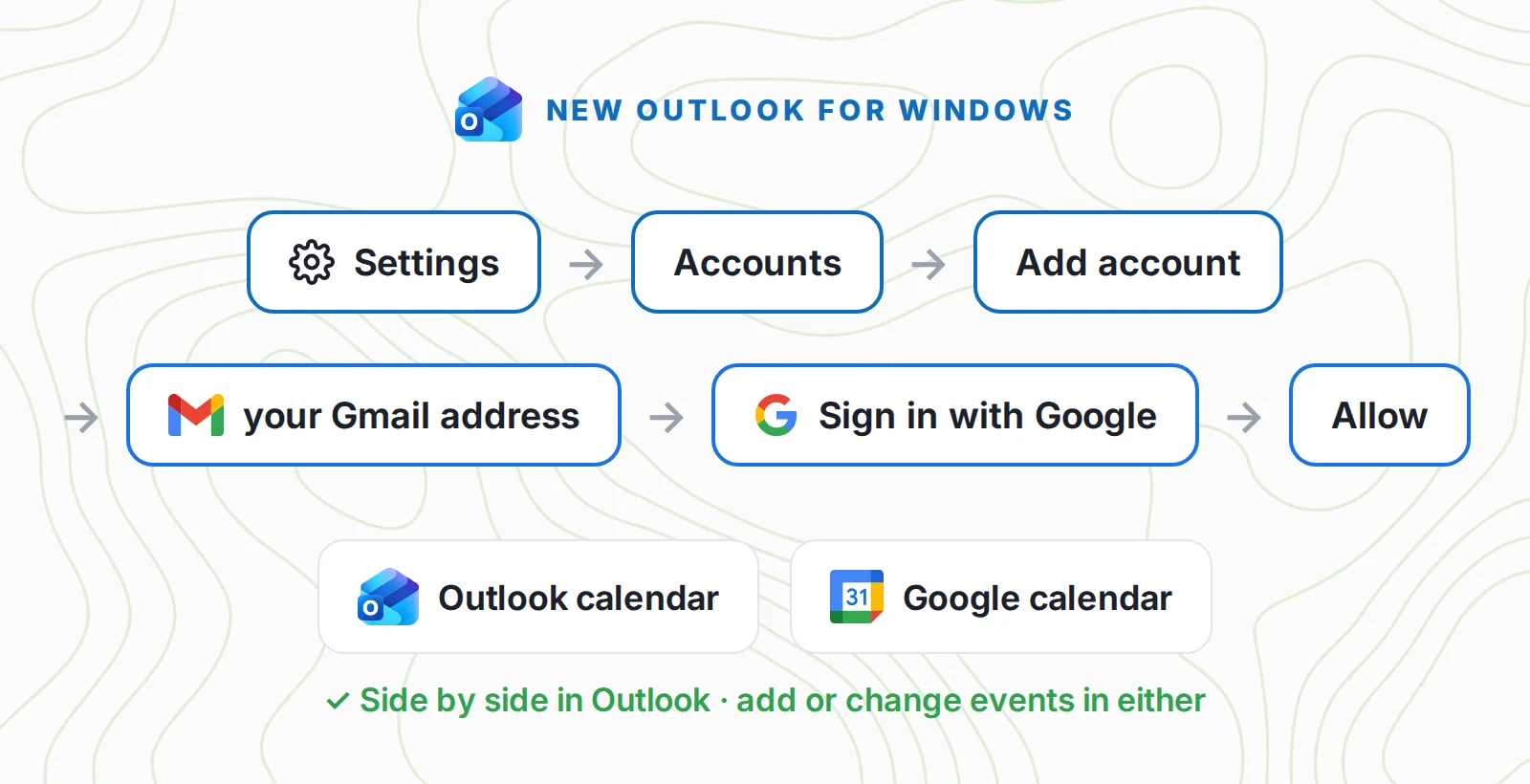
The Outlook app on iPhone and Android works the same way: add your Google account, and its calendars appear under it. Microsoft says calendar data from accounts like Gmail can take a few minutes to sync.
On a work or school Microsoft 365 account, Outlook on the web has its own option. Click Add calendar, then Add personal calendars, and connect your Google account. Microsoft's page on showing personal events on your work calendar says you can connect one Outlook.com or Google account, view and manage its events, and that it only shows in Outlook on the web.
The catch
The two calendars stay separate. An event you add to your Outlook calendar is not copied into Google, so anyone looking at your Google calendar won't see it. And Outlook.com, the web version for personal Microsoft accounts, no longer lets you connect a new Gmail account, so use the Windows or phone app for this.
Way 2: Sync Google Calendar to Outlook with the secret iCal address
Use this when you only need to see your Google calendar inside Outlook, for example in Outlook on the web at work. It takes about a minute.
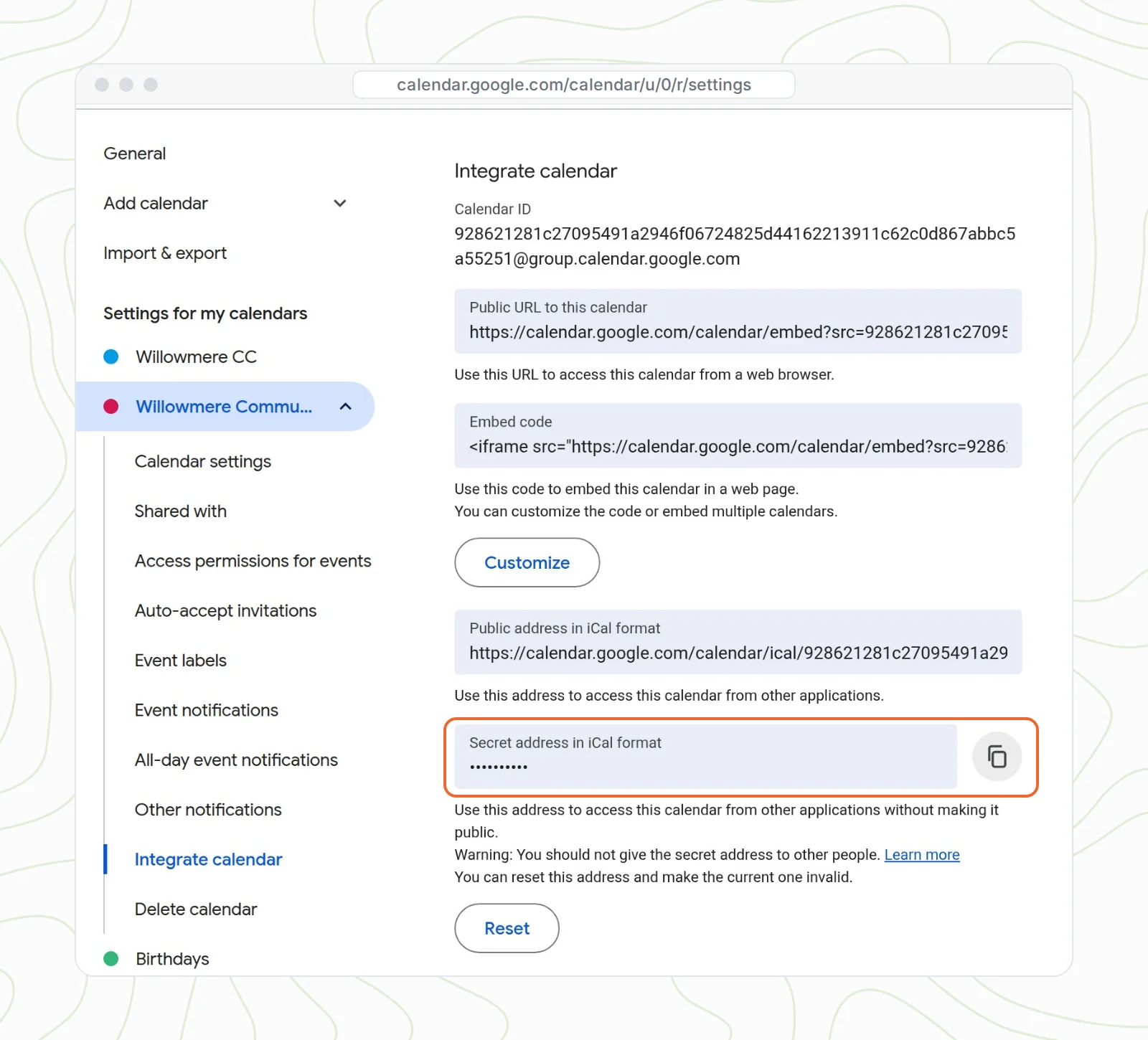
In Google Calendar, on a computer:
- Click the gear, then Settings.
- Under Settings for my calendars, click your calendar, then Integrate calendar.
- Copy the Secret address in iCal format.
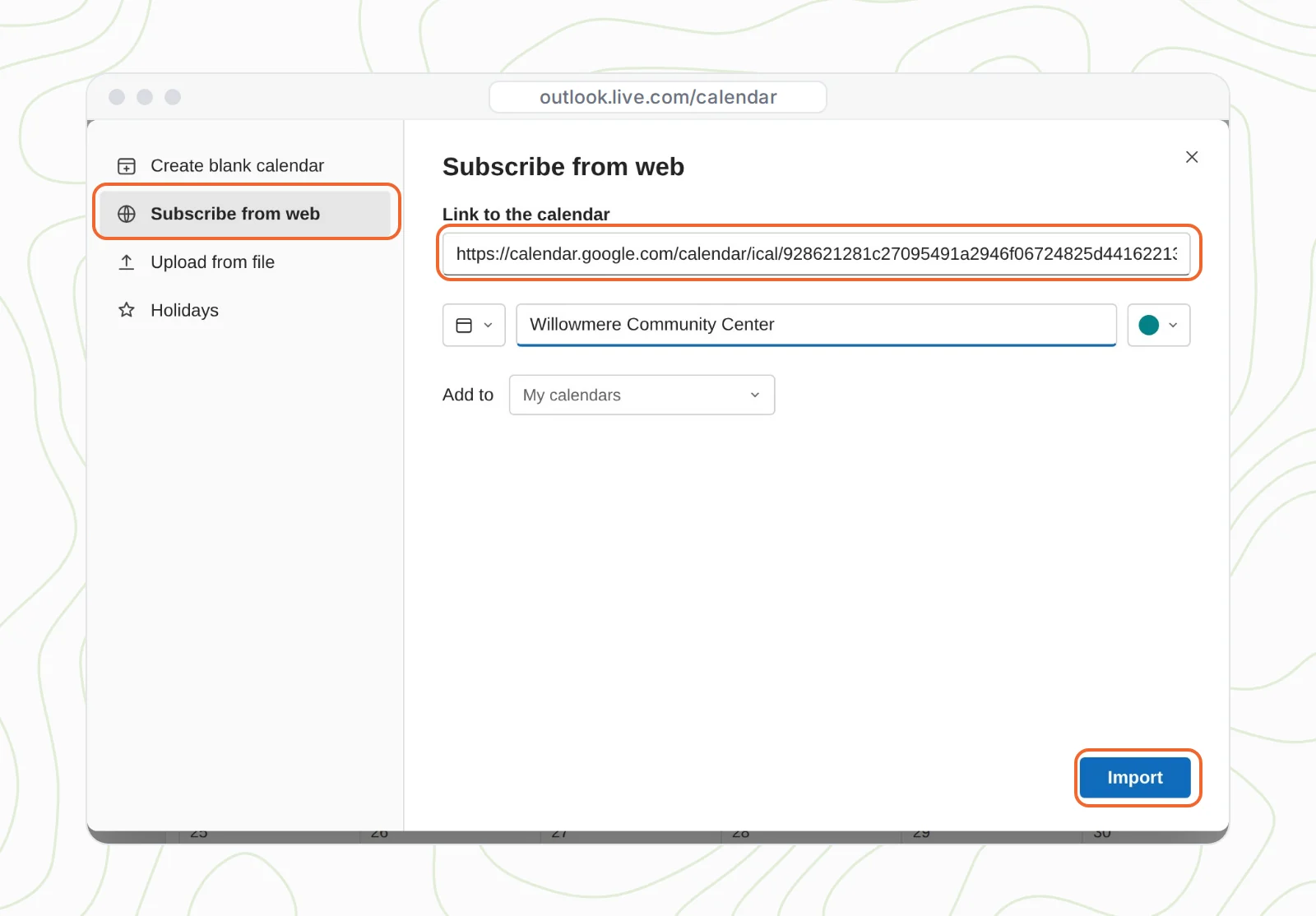
Then in Outlook.com or Outlook on the web:
- Click Add calendar, then Subscribe from web.
- Paste the link, give the calendar a name, and click Import.
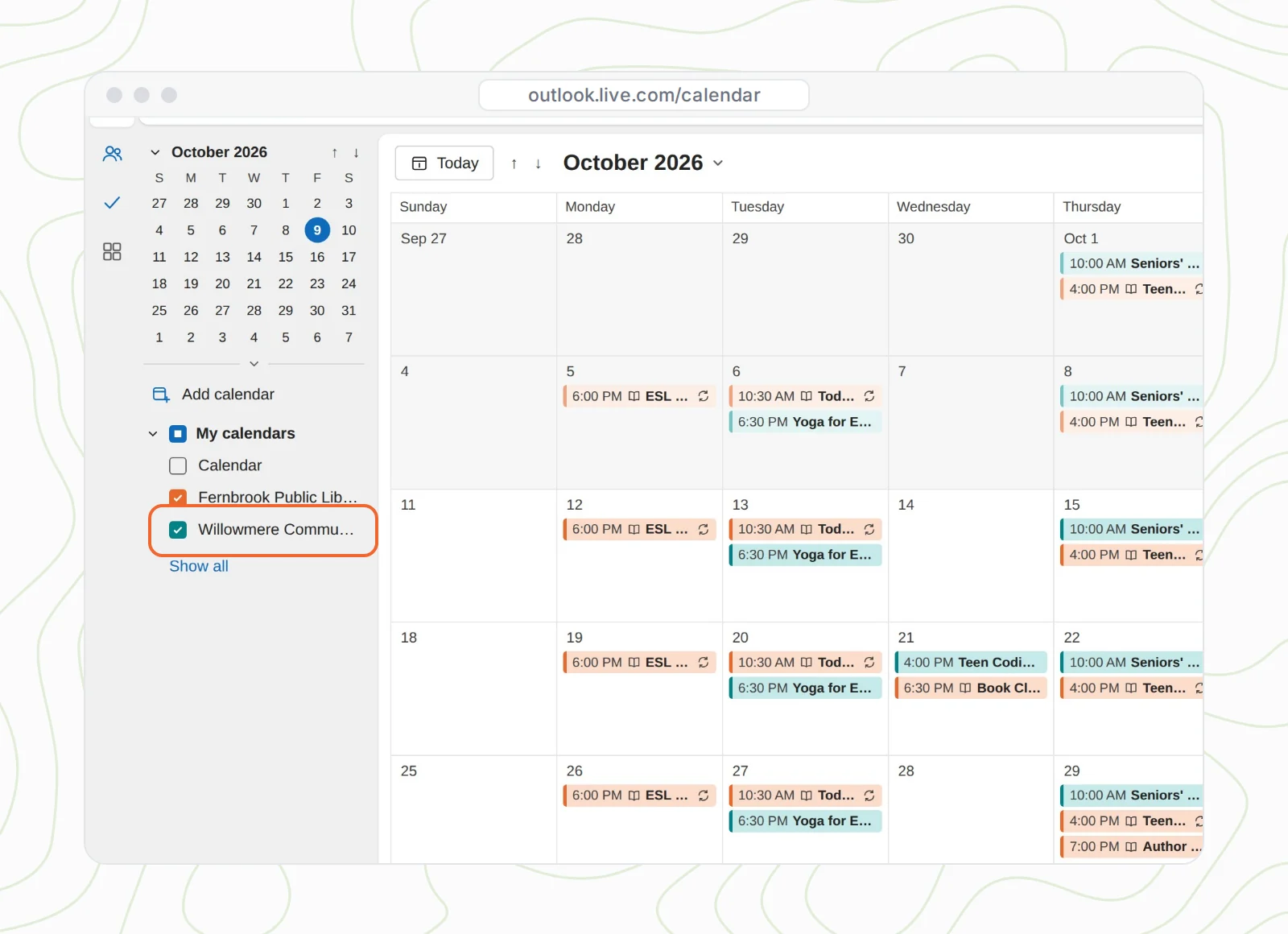
Your Google events now show up in Outlook as their own calendar, in their own color:
The catch
- It's one-way and read-only. You can't edit these events in Outlook. Change them in Google.
- Updates lag. Microsoft says a subscribed calendar refreshes approximately every 3 hours on Outlook.com and every 6 hours in Outlook on the web, and that it can sometimes take more than 24 hours.
- The secret address works like a password. Anyone who has it can see your calendar's details. If it leaks, click Reset in the same section, and Google makes a new one (the old one stops working).
- Work Google accounts may hide it. Google says that if you can't find the secret address, your admin may have turned it off.
Way 3: Sync Outlook Calendar to Google Calendar with an ICS link
This goes the other way, Outlook into Google. It's the one to use if you live in Google Calendar or on an Android phone and need your Outlook events there too. If you've never worked with calendar links before, our guide to what an ICS file is explains the format in two minutes.
In Outlook on the web:
- Open Settings, then Calendar, then Shared calendars.
- Under Publish a calendar, pick your calendar and choose Can view all details.
- Click Publish, then copy the ICS link (not the HTML one).
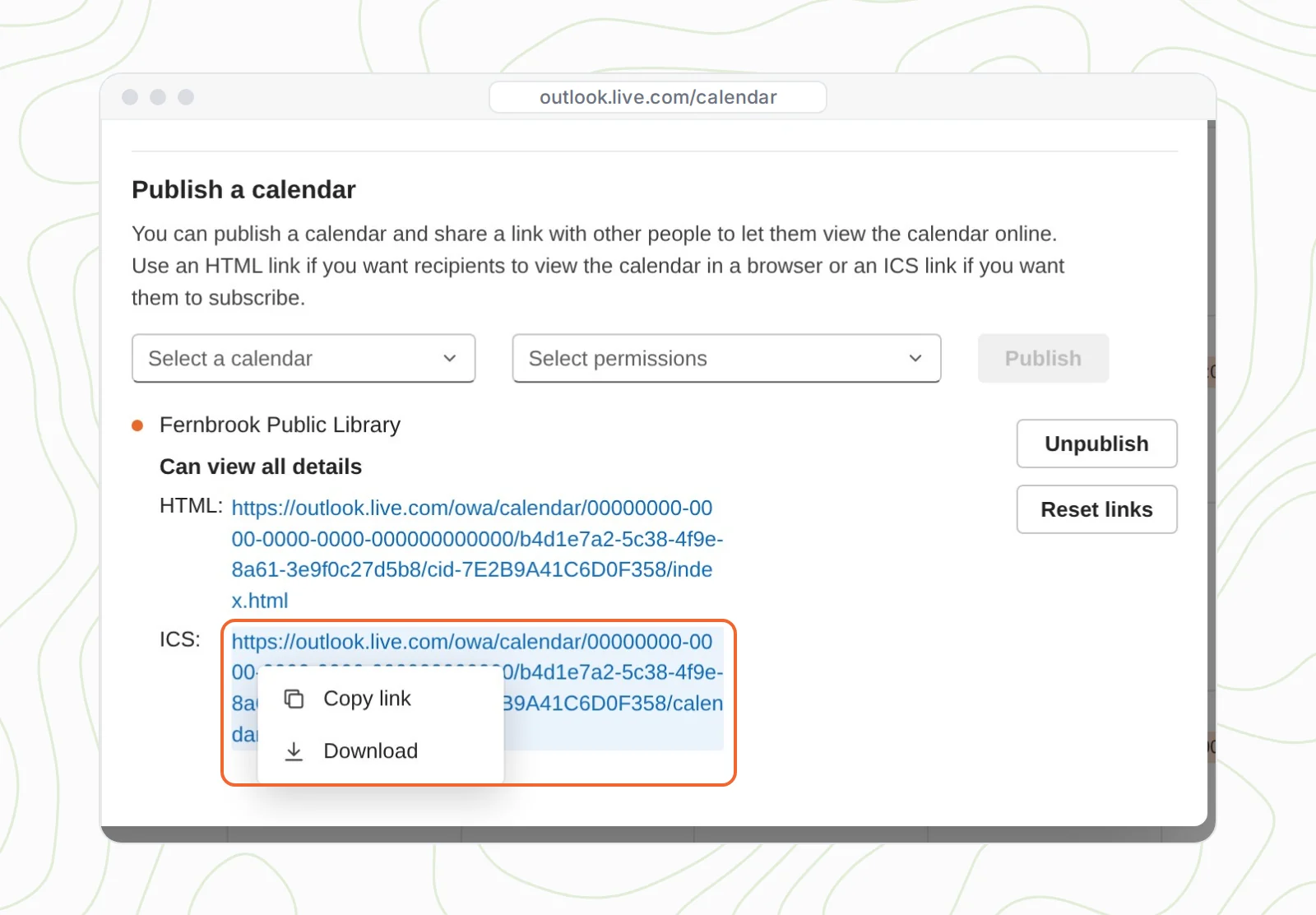
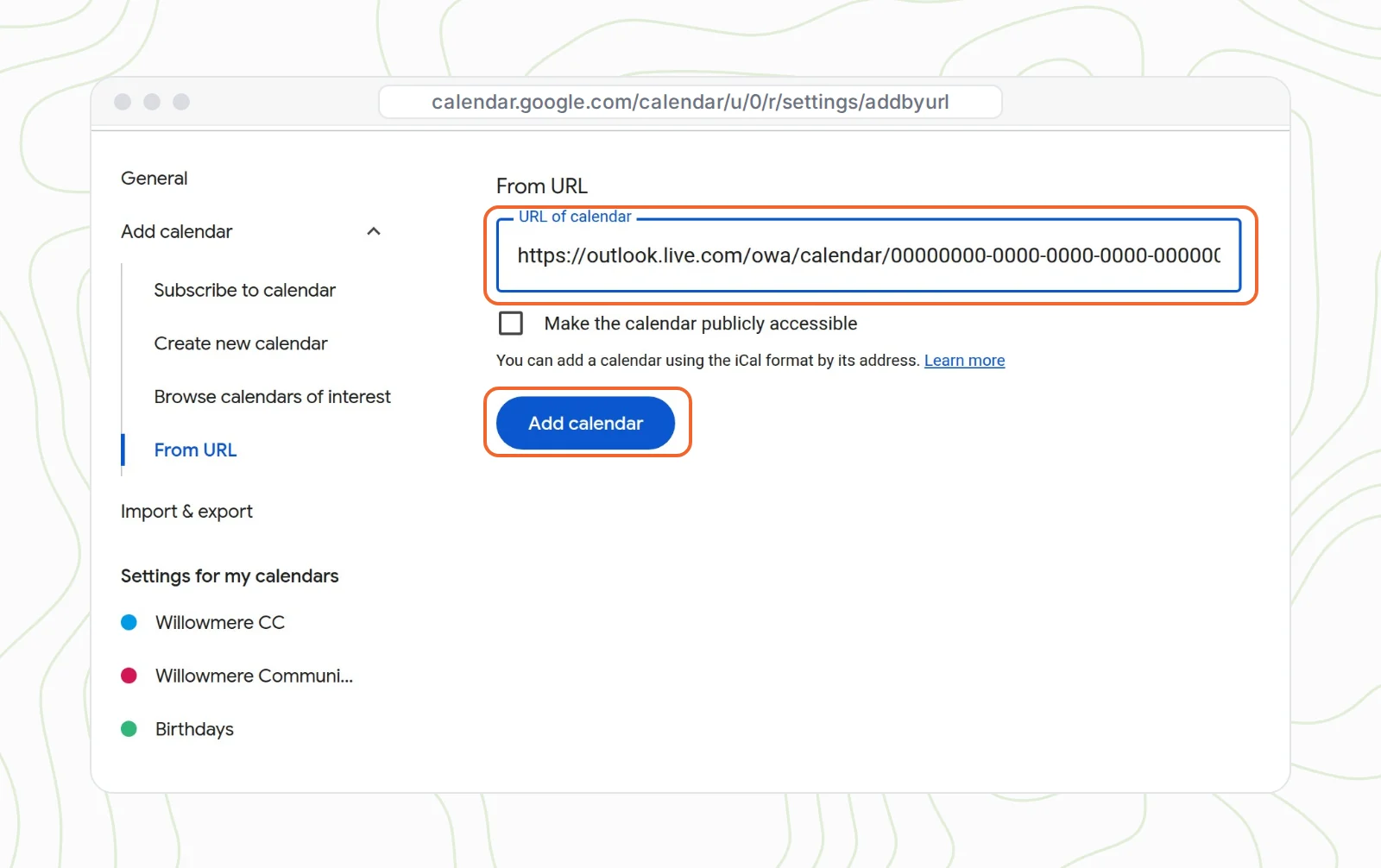
Then in Google Calendar, on a computer (the phone app can't add a calendar by link):
- Next to Other calendars, click +, then From URL.
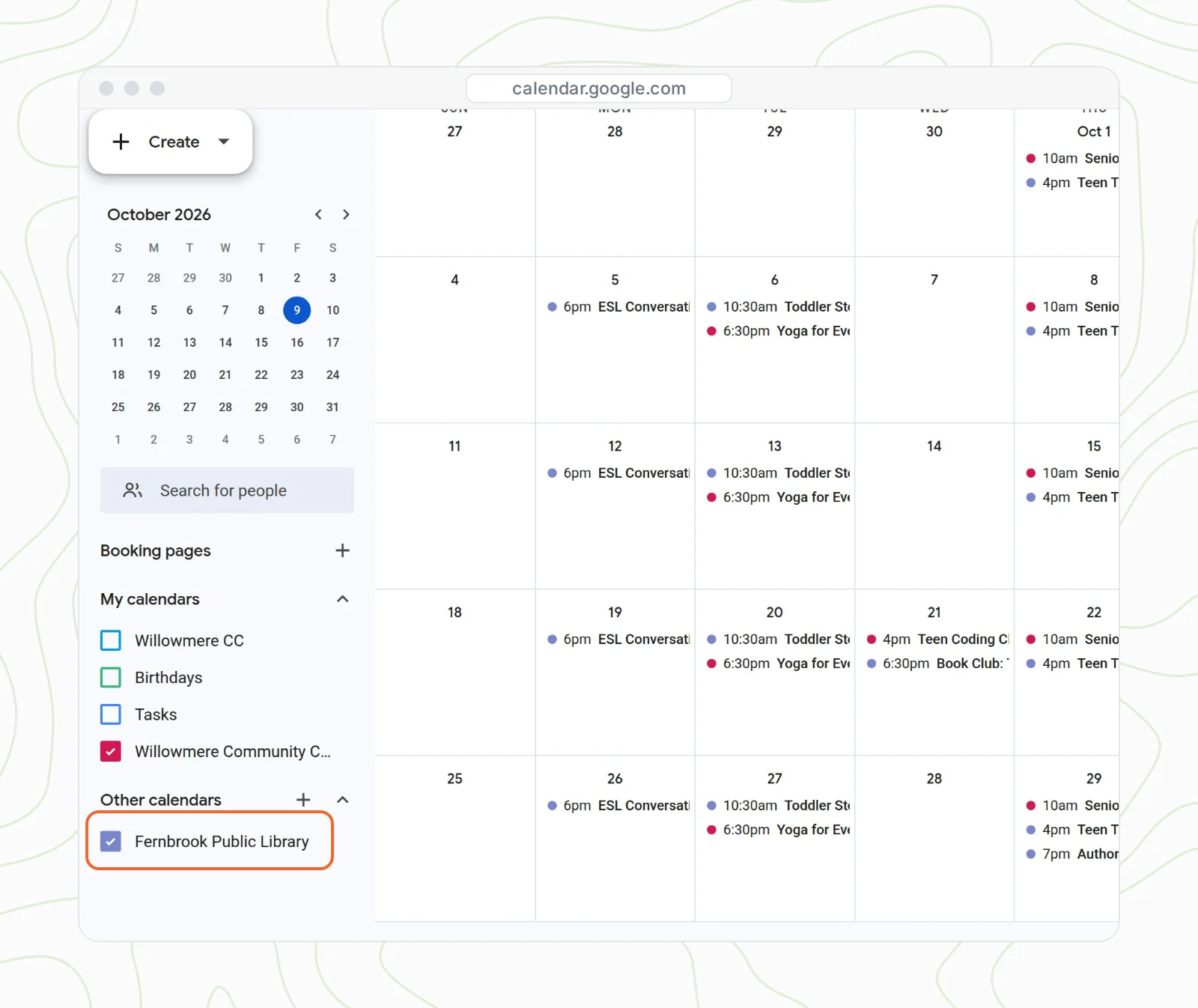
- Paste the link and click Add calendar.
The catch
- It's read-only too. Edit the events in Outlook.
- Google refreshes it on its own schedule. Google doesn't publish an interval for calendars added by URL, so expect changes to take hours.
- Anyone with the link can see the calendar. Microsoft's publishing help page is clear that published calendars are viewable by anyone who has the link. Click Reset links if one gets out.
- Work accounts may block it. On a Microsoft 365 account, your admin can turn calendar publishing off.
What about true two-way sync?
When most people say "two-way sync", they mean that an event added to either calendar gets copied into the other. Neither Outlook nor Google Calendar does that on its own, including Way 1, which shows both calendars side by side without copying anything.
If you really need copies, you have two official routes. Microsoft Power Automate has connectors for both Outlook and Google Calendar, so a flow can create a matching event whenever a new one appears. And if your company uses Google Workspace with classic Outlook for Windows, Google Workspace Sync for Microsoft Outlook keeps your Workspace calendar, email and contacts in sync with Outlook.
Dedicated calendar-sync services exist too. Before you pick one, check that it copies edits and deletions in both directions, not only new events. And watch for duplicates: if you accept the same meeting invite in both calendars while a sync is running, you can end up with two copies of it.
Sharing one schedule from both calendars with other people
Everything above is about you seeing your own calendars. A different problem comes up when you run a team, a club or a class and the events live in two places. Think of a community center whose programs sit in a coordinator's Google calendar, while the library next door keeps its events in Outlook. People want one schedule, and you don't want to copy anything by hand.
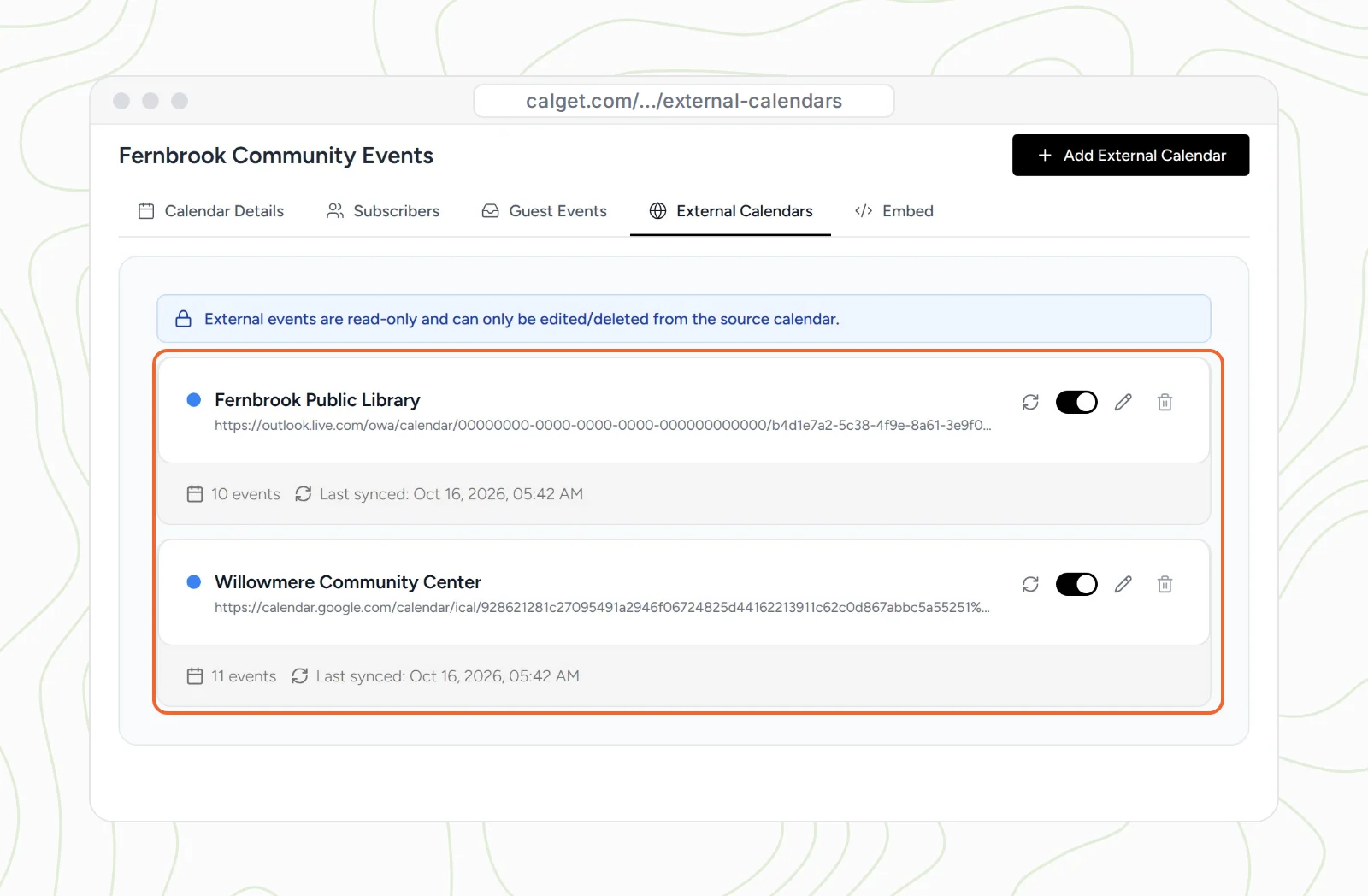
That's what CalGet's External Calendars feature is for. We tested it with a real Outlook.com calendar and a real Google calendar, synced into one calendar called Fernbrook Community Events:
- In CalGet, open your calendar, go to External Calendars, and click Add External Calendar.
- Paste your Google calendar's iCal link and click Sync Calendar.
- Do the same with your Outlook ICS link. If CalGet can't detect the time zone, pick the one your Outlook calendar uses, then sync.
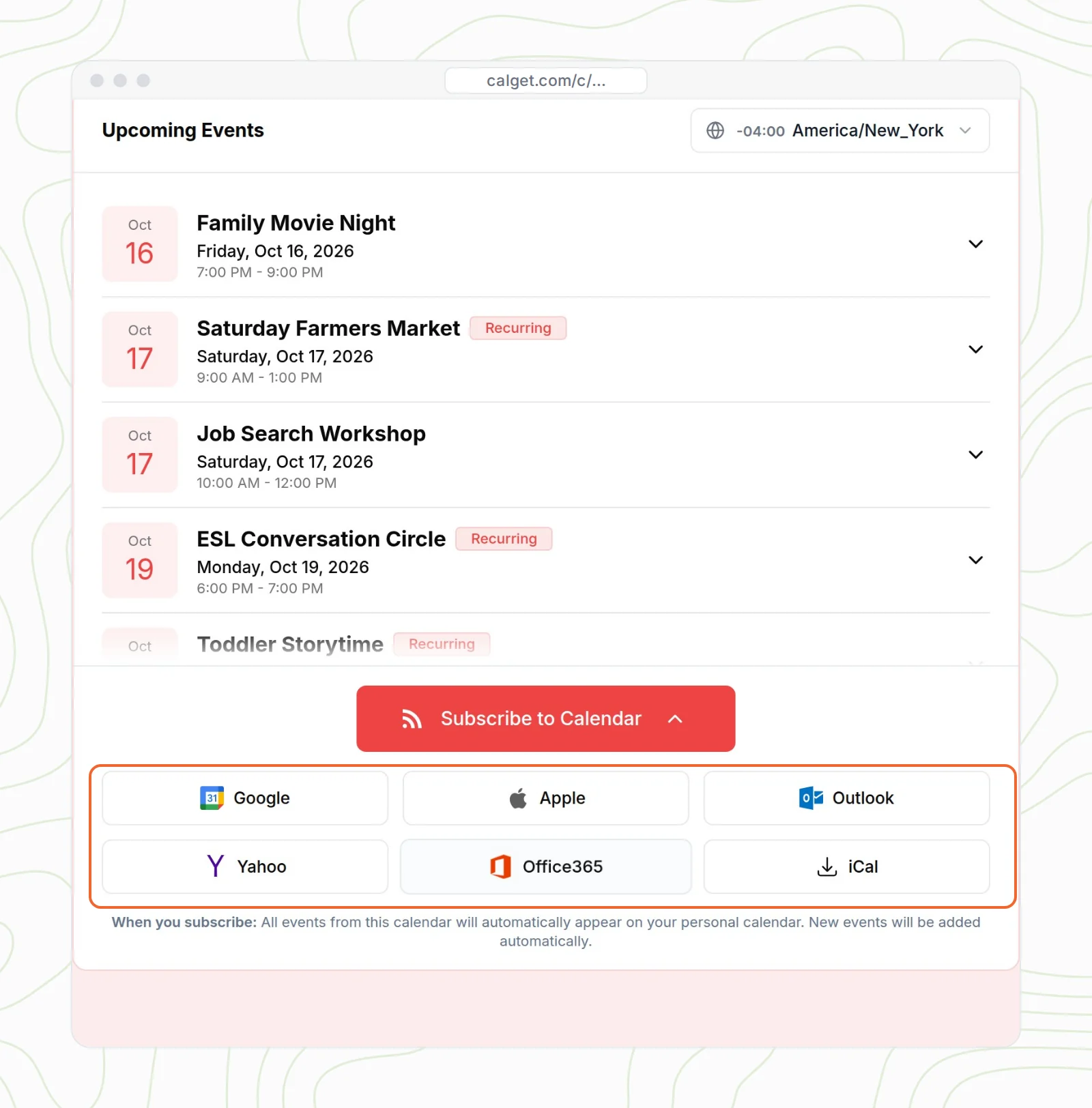
Now you share one link. People open the calendar's page and subscribe from Google, Apple, Outlook, Yahoo or Office 365, or download an ICS file, and new events show up in their own calendar without anyone sending an update. You can also embed the calendar on your website so visitors see both sources in one place.
External events are read-only in CalGet, the same way they are in Outlook and Google, so you keep editing them where they live. CalGet re-syncs them every 12 hours, and you can click Sync on either one anytime. It's not a tool for merging your personal calendars. It's for publishing one schedule that a lot of people follow.
Mistakes that stop synced calendars from updating
- Importing instead of subscribing. Importing an .ics file copies the events once and never updates. Our guide to importing ICS files into Google Calendar covers when a one-time import is the right call.
- Publishing with "Can view when I'm busy". Google then shows only blocks of busy time, with no titles. Republish with Can view all details.
- Pasting the HTML link into Google. Outlook gives you two links. Google needs the one that ends in .ics.
- Trying to add the link on your phone. Add it once on a computer. It then appears in the Google Calendar app on your phone.
- A link that starts with http. If a subscribed calendar shows nothing, Microsoft suggests removing it and adding it again with https at the start.
Frequently asked questions
Can Outlook and Google Calendar sync both ways?
Only inside the Outlook app. Add your Google account to the new Outlook for Windows or to Outlook for iPhone or Android, and you can see and edit both calendars there. Neither app copies events from one calendar into the other. For that, use Microsoft Power Automate, or Google Workspace Sync for Microsoft Outlook if you have Google Workspace and classic Outlook.
How often does Outlook update a subscribed Google Calendar?
Microsoft says about every 3 hours on Outlook.com and about every 6 hours in Outlook on the web. It can sometimes take more than 24 hours.
How often does Google Calendar update an Outlook calendar added by URL?
Google doesn't publish an interval. Changes usually take hours to appear, so a calendar added by URL isn't a good fit for last-minute changes.
Is it safe to share Google's secret iCal address?
No. Anyone with the secret address can see your calendar's event details. Keep it private, and if it gets out, click Reset under Integrate calendar in Google Calendar's settings to make a new one.
Can I combine an Outlook calendar and a Google calendar into one schedule for other people?
Yes. In CalGet, add both calendars' links under External Calendars. Their events land in one calendar, which people can subscribe to from Google, Apple or Outlook, or which you can embed on your website. It re-syncs every 12 hours, or when you click Sync.
Running a team, club or class with events in both Outlook and Google? Create a subscription calendar in CalGet and share every future event with one link.

Written by the CalGet team
Updated October 2026 · Checked against Google and Microsoft help pages
We build calendar tools for sharing schedules with lots of people, from sports clubs and schools to nonprofits. People at organizations like Harvard, Save the Children and OGC Nice use CalGet to get events into their audience's calendars.
“The entire team at CalGet is professional, easy to work with, and on top of every question.” Women's Network, a nonprofit that uses CalGet
Get Your Events on Everyone's Calendar.
Generate universal "Add to Calendar" links that work everywhere. Perfect for social media, emails, and websites.


Written by
Yared