Back to Blog
What Is Webcal? How Webcal Links Work in Every Calendar App
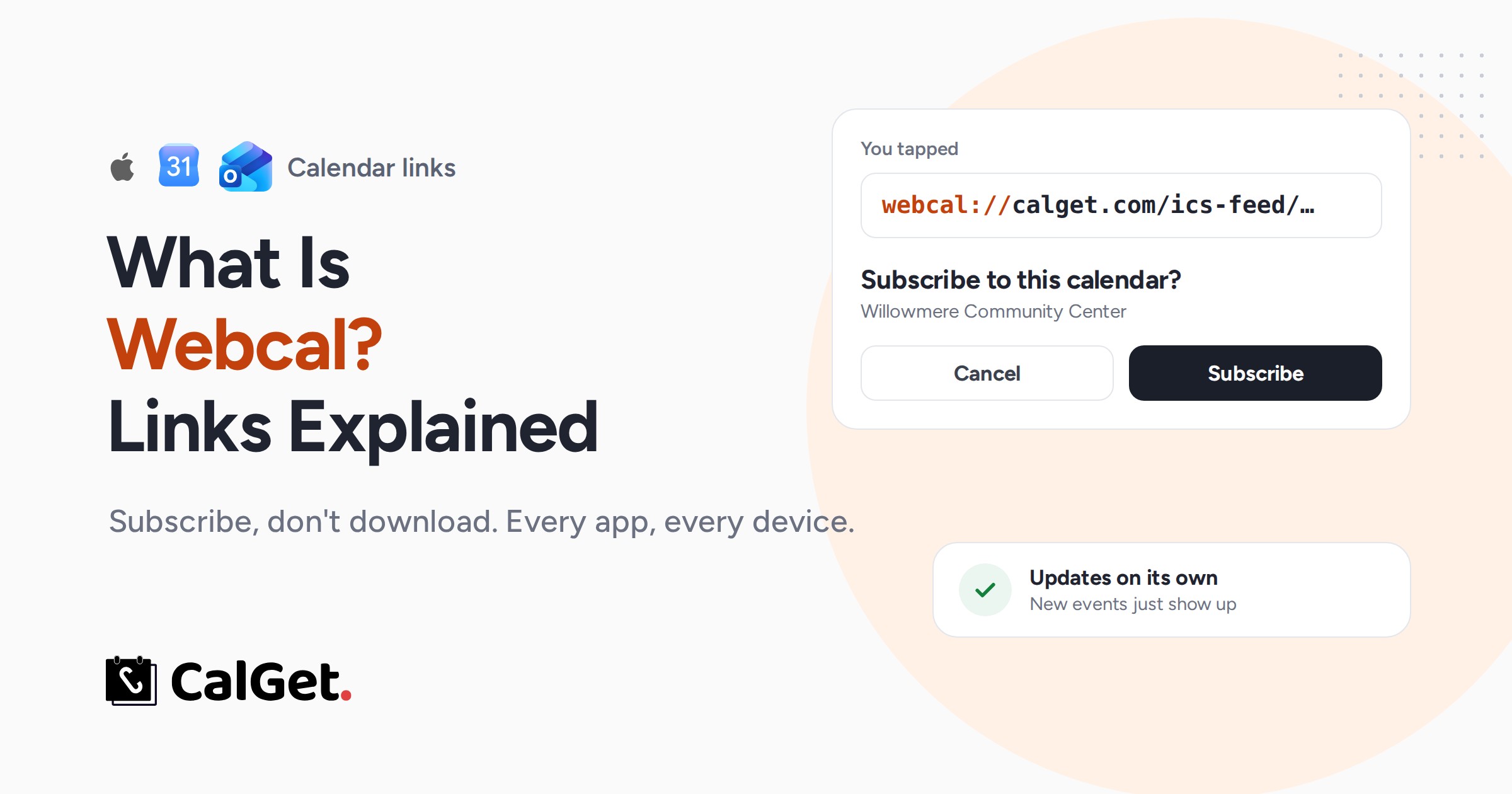
Webcal is the link prefix that tells your device to subscribe to a calendar instead of downloading it. Here's what happens when you click a webcal link on iPhone, Mac, Windows and Android, how to turn it into an https or .ics link, and how to fix one that won't open.
Written by
Last updated: October 2026. We tested webcal links with a real CalGet calendar feed and checked every step against IANA, Google Calendar Help, Apple Support and Microsoft Support in October 2026.
Quick answer
Webcal (webcal://) is a link prefix that tells your device to subscribe to an online calendar instead of downloading it. The rest of the link points to an ordinary calendar file (.ics). Once you subscribe, your calendar app checks that address again on its own, so new and changed events show up without you doing anything.
- Swap
webcal://forhttps://and you get the same .ics file. - iPhone, iPad and Mac open Calendar and offer to subscribe.
- Windows opens whichever app is set for WEBCAL links, often Outlook.
- Android usually has nothing that opens webcal links. Add the calendar in Google Calendar on a computer instead.
You tap "Subscribe" on your kid's school calendar and your iPhone asks if you want to add it. Your colleague taps the same link on Windows and Outlook opens. Someone else taps it on an Android phone and nothing happens at all. Or Windows asks which app should open "WEBCAL" links, and you have no idea what that means.
All of that comes down to one small prefix. This guide explains what webcal is, what happens when you click a webcal link on each device, how to turn a webcal link into a normal https or .ics link, and what to do when a webcal link doesn't work.
What does webcal mean?
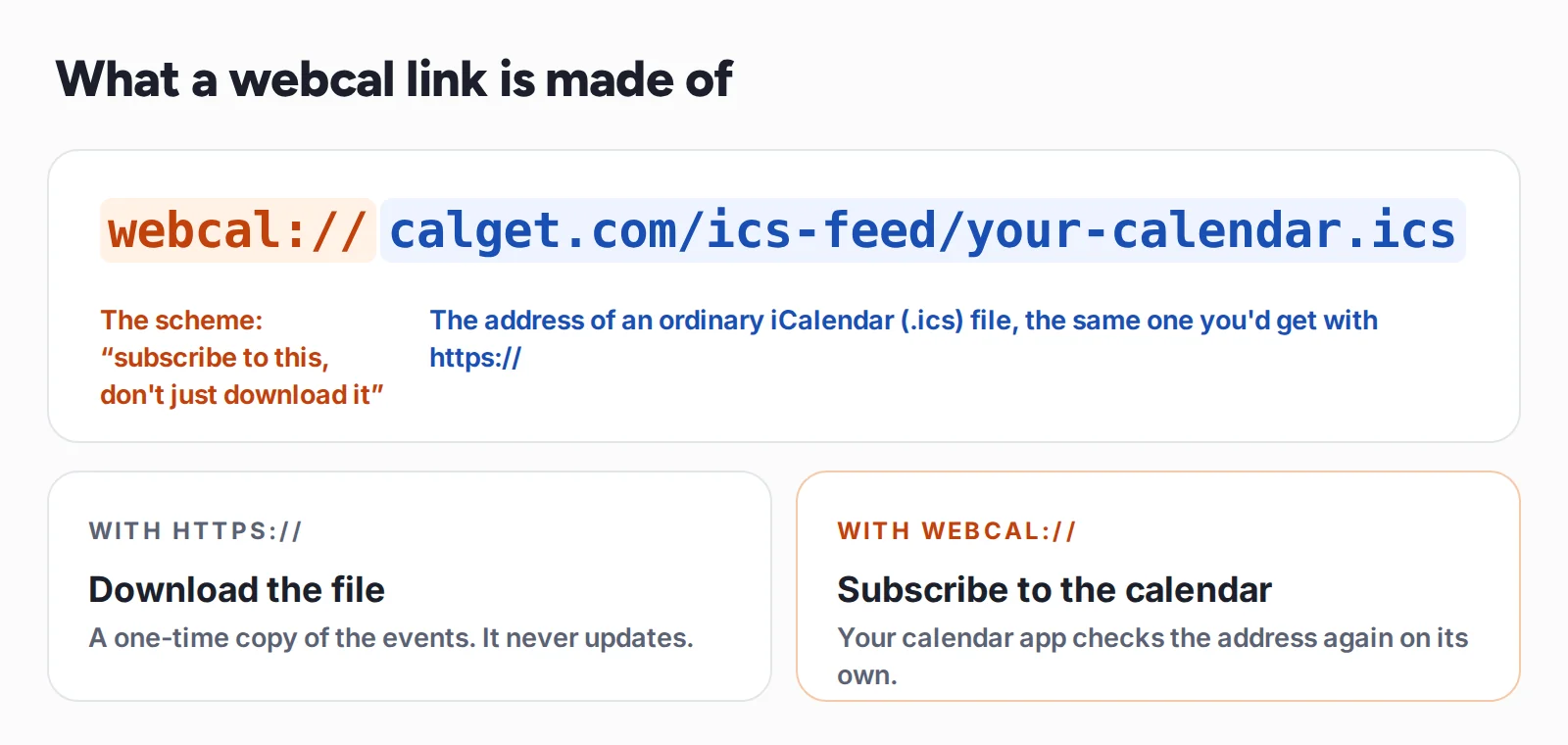
Webcal is a URI scheme, the part of a link before the colon, used to subscribe to calendars in the iCalendar (.ics) format. A webcal link points to the same file as an https link, but it tells your device to hand the address to a calendar app and subscribe to it, instead of downloading the file once.
Webcal was created for Apple's iCal app, the ancestor of today's Apple Calendar, and every major calendar app now understands it. It was never made an official web standard. The IANA registry of URI schemes lists webcal as provisional: its purpose is "subscribing to calendars in iCalendar format", and the transport is plain HTTP.
That last part matters. Webcal isn't a separate protocol. When your calendar app subscribes, it swaps webcal:// for https:// (or http://) and fetches the file like any web page. We checked this with a real CalGet calendar feed:
webcal://calget.com/ics-feed/…icsis the link a subscriber taps.- The same address over
https://returns the calendar file itself, served astext/calendar, with all 11 events in it. - Over plain
http://, the server redirects tohttps://, so the feed always travels encrypted.
So "webcal" really means: this is a calendar you can follow, not just a file you can save.
Webcal vs https vs .ics vs CalDAV
These four get mixed up constantly. Here's the difference in one table.
| What it is | What your device does | Stays up to date? | Can you edit events? | |
|---|---|---|---|---|
| webcal:// link | A link to an .ics file, marked "subscribe" | Opens a calendar app and subscribes | Yes, on the app's refresh schedule | No, read only |
| https:// link to an .ics | The same file, as a normal web address | Usually downloads it or shows it as text | Only if you paste it into a subscribe box | No |
| .ics file | A calendar file on your device | Imports the events once | No, it's a snapshot | Yes, the imported copies are yours |
| CalDAV | A full sync protocol (RFC 4791) | Connects an account, like iCloud or Fastmail | Yes, both ways | Yes, changes sync back |
If you want people to follow a schedule, like a school, a team or a venue, webcal is the right tool. If you want them to save one event, an .ics file or an add-to-calendar link is simpler. For more on the file format itself, see what an ICS file is.
What happens when you click a webcal link
A webcal link only works if your device has an app that has said "I handle webcal". That's why the same link behaves so differently from one device to the next.
On an iPhone or iPad
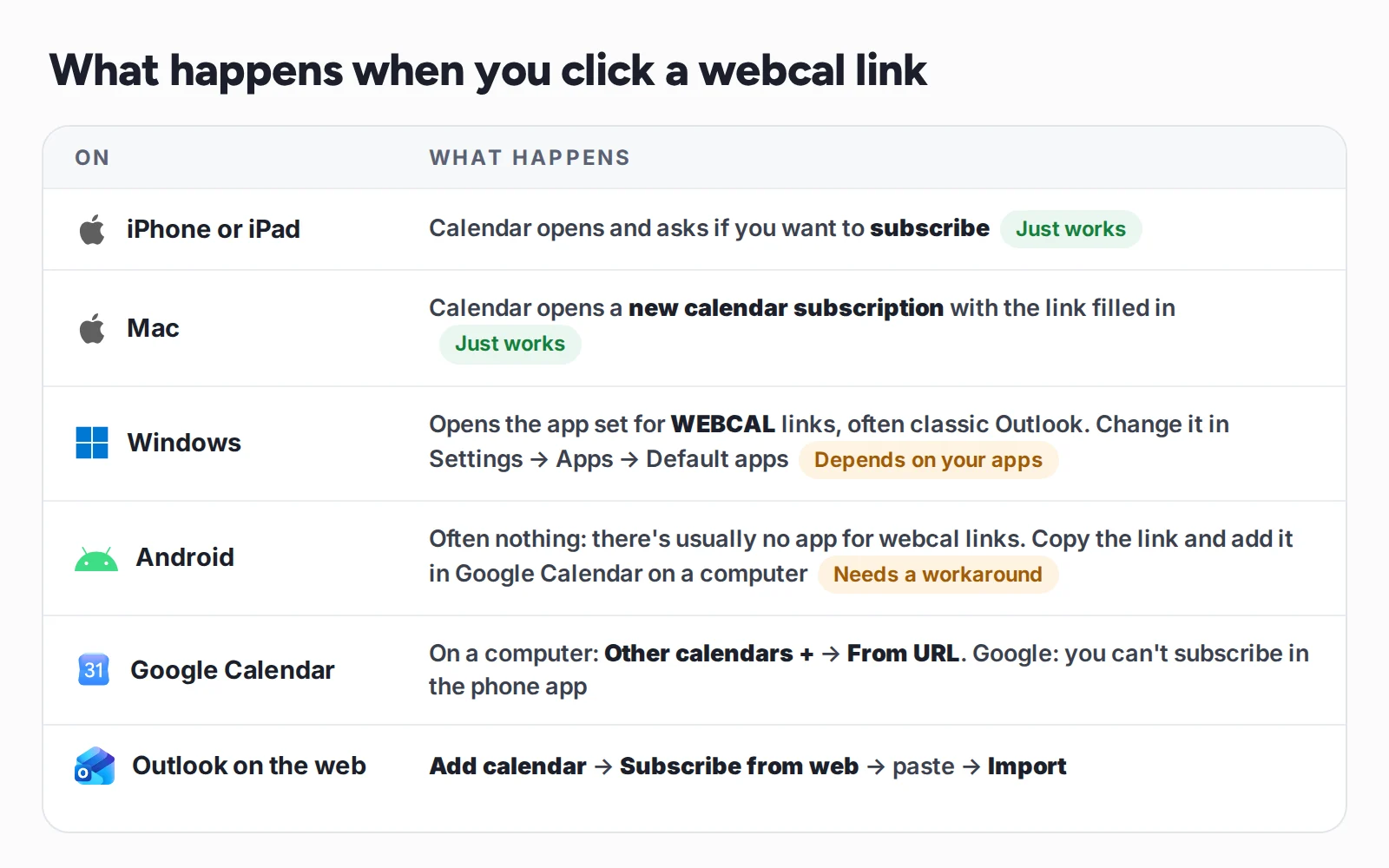
Tap a webcal link and Calendar asks whether you want to subscribe. Confirm, and the calendar appears in your Calendars list, separate from your own events. You can also add one by hand. Apple's steps for iOS 26 and later: open Calendar, tap Calendars, then Add Calendar → Add Subscription Calendar, paste the link, tap Find, then Done. A webcal or https address both work.
On a Mac
Clicking a webcal link opens Calendar with a new subscription ready to go. To add one by hand, choose File → New Calendar Subscription, paste the link, and click Subscribe. Mac Calendar also lets you choose how often the subscription refreshes. If you pick iCloud as the location, the subscription shows up on your iPhone and iPad too.
On Windows: what is "WEBCAL" in Default apps?
If you've seen WEBCAL in Windows Settings, this is it. Windows keeps a list of which app opens which kind of link (MAILTO for email links, WEBCAL for calendar subscriptions, and so on). When you click a webcal link, Windows opens whatever app is set for WEBCAL, often classic Outlook, which asks if you want to add the internet calendar and subscribe to updates.
To change it in Windows 11: Settings → Apps → Default apps → Choose defaults by link type, find WEBCAL, and pick the app. In Windows 10 the same setting is called "Choose default apps by protocol". If no app on your PC handles webcal, Windows asks you to pick one or does nothing. In that case, copy the link and add it to your calendar by hand (see Google Calendar and Outlook below).
On Android
This is where webcal links most often "don't work". Most Android phones have no app registered for webcal, and the Google Calendar app can't subscribe to calendars at all. Google's own help page is clear: "You can't subscribe to a calendar in the Google Calendar app for Android, iPhone, or iPad."
The fix takes a minute:
- Copy the webcal link (long-press it, then Copy link).
- On a computer, add it to Google Calendar with From URL (steps below).
- On your phone, open Google Calendar's settings, find the new calendar, and make sure it's turned on to sync.
In Google Calendar
Following Google's steps: open Google Calendar on a computer, click the + next to Other calendars, choose From URL, paste the link and click Add calendar. It appears under Other calendars and syncs to the Google Calendar app on your phone. If Google won't accept a link that starts with webcal://, change it to https:// and try again. Google doesn't publish how often it refreshes subscribed calendars, so a change can take a while to show up.
In Outlook
In Outlook on the web and Outlook.com: Calendar → Add calendar → Subscribe from web, paste the link, give it a name, and click Import. Microsoft says subscribed calendars there update "approximately every 6 hours", and it can take more than 24 hours. In classic Outlook for Windows, clicking a webcal link usually does the work for you.
How to convert a webcal link to https or an .ics file
Searches for "webcal to ics" and "webcal to https" usually come from one of two situations: an app that won't accept webcal links, or someone who wants the actual file. Either way, the conversion is one edit:
- Copy the webcal link.
- Replace
webcal://at the start withhttps://. Nothing else changes. - Paste the new link into your calendar's "subscribe" or "from URL" box, or open it in a browser to download the .ics file.
One warning: if you download the .ics and import it, you get a snapshot. It won't update when the organizer adds or moves events. To stay in sync, always subscribe with the link instead of importing the file. (If you do want a one-time import, here's how to import an ICS file into Google Calendar.)
How good subscribe buttons use webcal
A raw webcal link leaves a lot to chance: the device, the default app, the operating system. That's why well-built subscribe buttons don't just hand out one link. They give each calendar app its own door to the same feed.
Here's what each button on a CalGet subscribe menu actually opens. We clicked every one in October 2026:
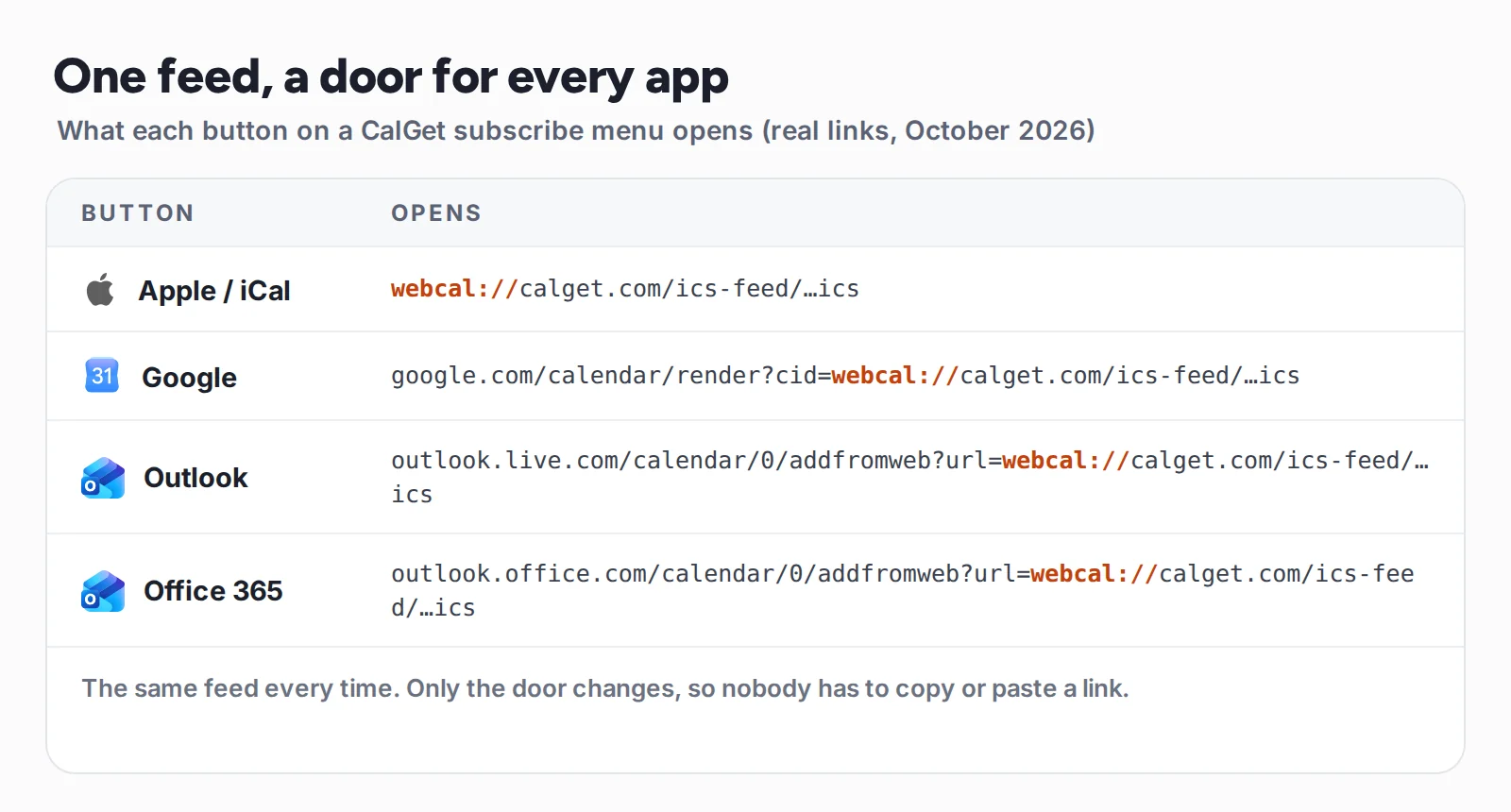
Apple users get the webcal link, which their devices already handle. Google and Outlook users land on their own calendar's "add calendar" page, so it works even when their computer has no webcal app set up. Nobody has to know what webcal is.
Setting up a calendar like this? Here's how to create a subscription calendar, with the built-in Google, Apple and Outlook ways and their catches.
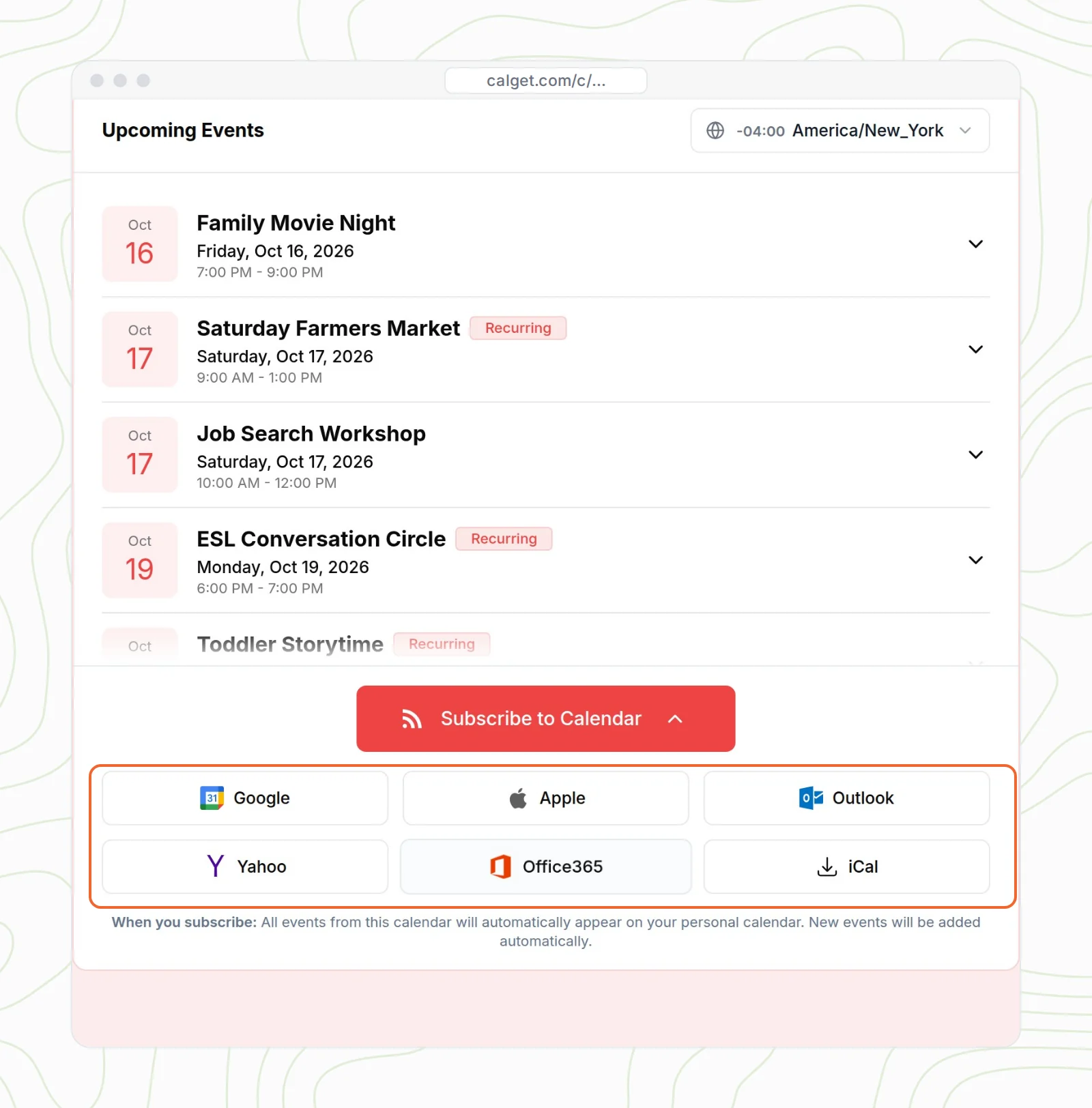
If you share a schedule with lots of people, a subscription calendar with a subscribe menu like this saves you from writing instructions for every device. You can also collect subscribers' names and emails when they follow it.
Webcal link not working? Here's why
- Nothing happens when you tap it. Your device has no app for webcal links, which is common on Android and on some Windows PCs. Copy the link and add it by hand in Google Calendar (on a computer) or Outlook.
- The wrong app opens on Windows. Change the WEBCAL default in Settings → Apps → Default apps → Choose defaults by link type.
- A file downloads instead. The link starts with https://, so your browser treated it as a file. Paste it into your calendar's subscribe box instead of opening the download.
- Google Calendar won't add it. Use a computer, not the phone app, and try the link with
https://instead ofwebcal://. - New events aren't showing up. Subscribed calendars refresh on the app's schedule, not instantly. Outlook on the web can take more than a day. Also check that you subscribed rather than imported a file.
- The calendar disappeared or shows an error. The organizer may have changed or reset the link. Ask them for the current one.
- Events show at the wrong time. Check the time zone setting in your calendar app, and tell the organizer if every event is off by the same amount.
Is webcal safe?
Subscribing to a webcal link is read only. The calendar can't see or change your other events, and you can delete the subscription at any time. Two things are worth knowing, though:
- The link is the key. Anyone with a webcal link can read that calendar. That's fine for a public schedule, but never share a private one. Google's "Secret address in iCal format" is exactly this kind of link, and Google says only you should know it. Here's how to share a Google Calendar with people who don't use Google without giving it away.
- Only subscribe to calendars you trust. A subscribed calendar can add any events its owner likes. If you don't recognize a calendar in your list, remove it.
How we tested this
In October 2026 we subscribed to a real CalGet calendar feed and checked what its webcal address returns over https and http (the .ics file, served as text/calendar; http redirects to https). We clicked every button on a CalGet subscribe menu to record the links in this guide. We checked the IANA registry entry for webcal, and every subscribe step against Google Calendar Help, Apple Support and Microsoft Support, linked above.
Frequently asked questions
What is a webcal link?
A webcal link is a calendar link that starts with webcal://. It points to an iCalendar (.ics) file online and tells your device to subscribe to it, so the calendar stays up to date, instead of downloading a one-time copy.
Is webcal the same as iCal?
Not quite. iCal was Apple's calendar app (now Apple Calendar), and "iCal" is often used for the iCalendar (.ics) file format. Webcal is the link prefix, created for iCal, that says "subscribe to this .ics file". Every major calendar app supports it, not only Apple's.
What is webcal in Default apps on Windows?
It's the setting that decides which app opens webcal links. In Windows 11 go to Settings → Apps → Default apps → Choose defaults by link type, find WEBCAL, and pick your calendar app, for example Outlook.
How do I open a webcal link on Android?
Usually you can't open it directly: most Android phones have no app for webcal links, and Google says you can't subscribe in the Google Calendar app. Copy the link, add it in Google Calendar on a computer with Other calendars → From URL, and it will sync to your phone.
How do I convert webcal to https or ICS?
Replace webcal:// with https://. The new link points to the same .ics file: open it in a browser to download it, or paste it into any calendar's subscribe box.
How often does a webcal calendar update?
It depends on the app. Microsoft says Outlook on the web updates subscribed calendars about every 6 hours, and it can take more than 24 hours. Mac Calendar lets you choose. Google doesn't publish a schedule. For last-minute changes, tell people directly too.
Share a schedule
A subscribe button that works on every device
Give people one Subscribe button for Google, Apple, Outlook, Office 365 and Yahoo. No webcal instructions, no copy and paste. New events show up on their own.
Create your subscription calendarHow subscription calendars work
Want your calendar on a website too? See how an embeddable calendar works. Sharing from Google? Here's how to share a Google Calendar with people who don't use Google.

Written by the CalGet team
Updated October 2026 · Tested with a real calendar feed, checked against IANA, Google, Apple and Microsoft
We build calendar tools for sharing events with lots of people, from sports clubs and schools to nonprofits. People at organizations like Harvard, Save the Children and OGC Nice use CalGet to get events into their audience's calendars.

“Great Add Event to Calendar platform. Easy to create events and add them to emails and websites. Support responds quickly to questions and provides clean and concise answers. Highly recommended.” Foto Guy, on Trustpilot
Get Your Events on Everyone's Calendar.
Generate universal "Add to Calendar" links that work everywhere. Perfect for social media, emails, and websites.


Written by
Yared