Subscribers don't see my new event yet
Updated October 20, 2026
You added or changed an event, but people who subscribe to your calendar don't see it yet. This is almost always their calendar app waiting before it checks for updates. Here's why, and what you and your subscribers can do.
Why it happens
Your calendar's subscribe link is a live feed. CalGet updates it the moment you save. In our tests, a new event was in the feed within a second, and a deleted event was gone as fast.
But subscribers don't read the feed all the time. Each calendar app checks it on its own schedule, and that schedule is set by the app, not by CalGet:
| Subscriber's app | How often it checks |
|---|---|
| Google Calendar | Google doesn't publish a schedule. Expect it to take hours. |
| Outlook.com | About every 3 hours, says Microsoft, and it can take more than 24 hours. |
| Outlook for work or school | About every 6 hours, says Microsoft, and it can take more than 24 hours. |
| Apple Calendar on a Mac | As often as the subscriber chooses, and they can refresh by hand (see below). |
Check when a subscriber's app last updated
- Click Calendars, then click your calendar.
- Click the Subscribers tab.
- Look at Last Sync. It's the last time that subscriber's calendar app checked your calendar. If it's before your change, their app hasn't picked it up yet.
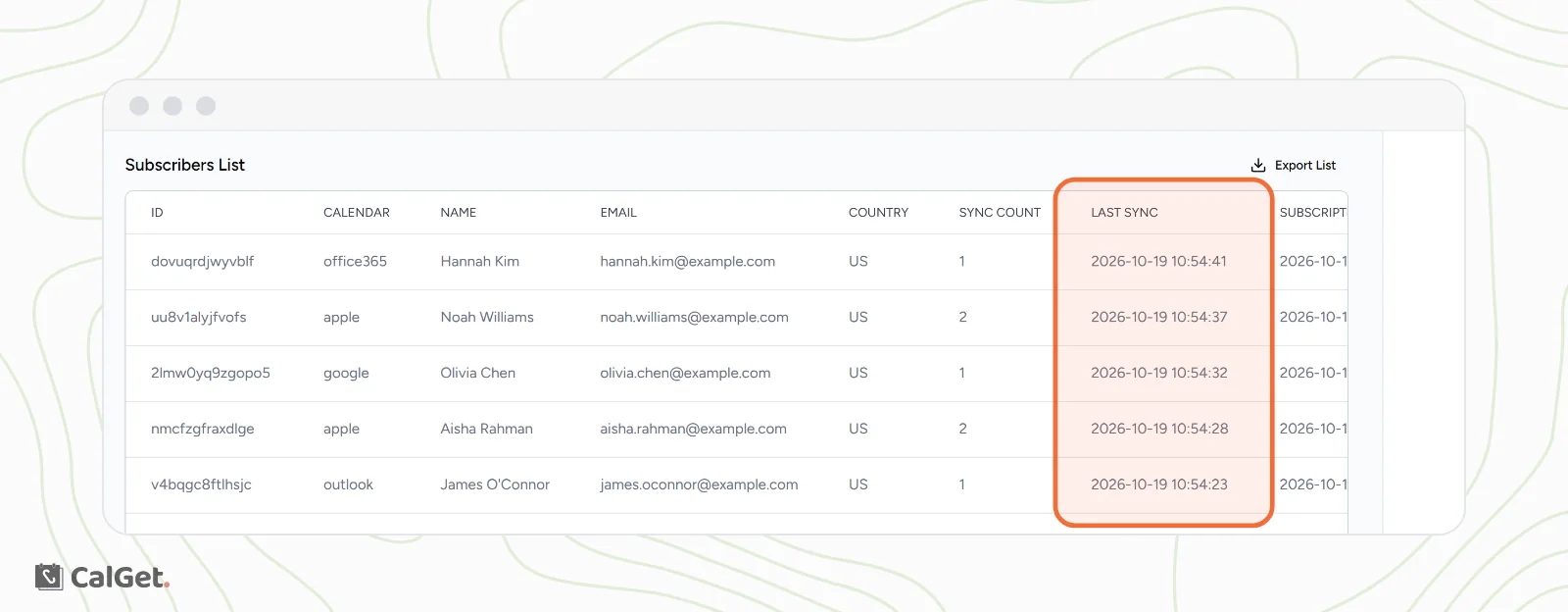
The Calendar column tells you which app they use, so you know which schedule from the table applies. More about this list: View, export and block calendar subscribers.
What subscribers can do
- Apple Calendar on a Mac: choose View > Refresh Calendars to update right away. To make it check more often, Control-click the calendar's name, choose Get Info, and pick a shorter time under Auto-refresh.
- Google Calendar and Outlook: there's no button to force an update. The change shows up on the app's next check.
What you can do
- Check the event is in the right calendar. Open the event, click the Edit tab and look at the calendar menu at the bottom of the form.
- Open your calendar's Public Link. If the event shows there, it's in the feed too, and subscribers will get it on their app's next check.
- For urgent changes, like a cancellation on the day, send a message as well. Don't rely on the calendar alone.
Common questions
Is something wrong with my calendar?
Not if the event shows on your calendar page. The delay is on the subscriber's side, and it's the same for every subscription calendar, not only CalGet.
Do event links and Add to Calendar buttons have this delay?
No. When someone adds a single event with an Add to Calendar button, they get a copy at that moment. That copy doesn't update later, so tell them about important changes. Subscriptions are the way to keep people's calendars up to date automatically.